Home Row Keys – A Beginners Guide To Touch Typing
October 25, 2026
By TezType
Have you ever seen someone typing on a keyboard and been amazed at how they manage to type without looking? They look at the screen and their fingers fly across the keyboard to hit the right keys. This is all done thanks to the home row!
This guide will teach you everything you need to know about home row keys. We will show you which fingers go where, and how to practice to really make it stick. All you will need is a keyboard and some patience!
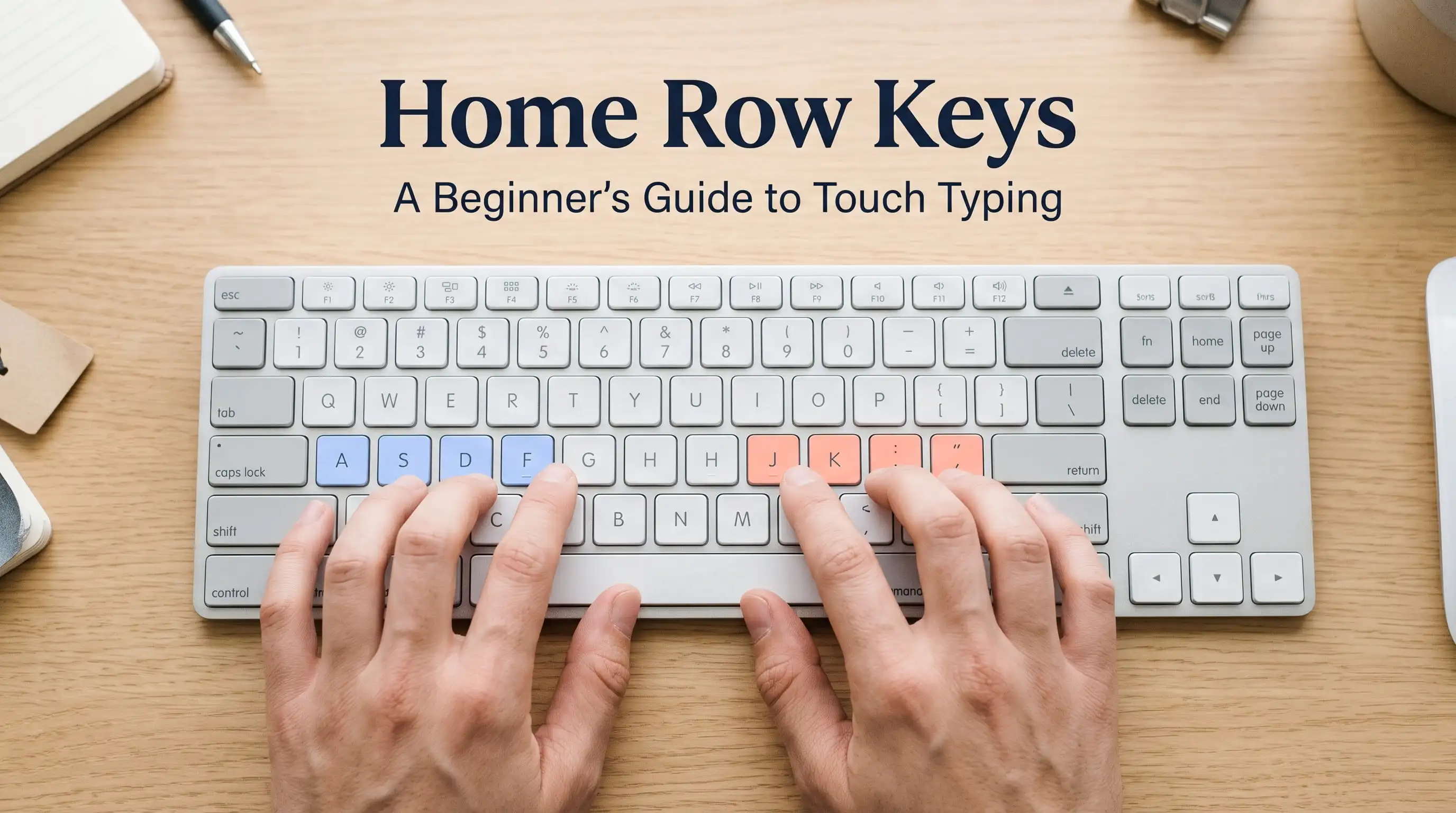
What are home row keys?
The home row is the middle row of keys. On a standard English keyboard the left hand sits on A, S, D and F. The right hand sits on J, K, L and the semicolon key. The thumbs sit lightly on the space bar.
They are in the centre so your fingers can easily reach the top and bottom rows. They are your campsite! You go out and hit the required key and come back.
Little Bumps
Look at the F and J keys. Most keyboards will have a very small bump or line on these keys. This is there to help your index fingers find the home row without looking.
Put your left index finger on the F key and your right index finger on the J key. The rest of your fingers will naturally fall into place. If your keyboard doesn’t have good bumps you can easily just use a small piece of tape.
Which finger goes where?
Each finger has a small section of the keyboard:
- Left pinky – Q, A, Z
- Left ring finger – W, S, X
- Left middle finger – E, D, C
- Left index finger – R, F, V and T, G, B
- Right index finger – U, J, M and Y, H, N
- Right middle finger – I, K, Comma
- Right ring finger – O, L, Full Stop
- Right pinky – P, Semicolon, Slash
Don’t try to learn this all in one go. You will learn by practicing. Just remember that each finger has its own lane.
Most Important Habit
Always return to your home row position after hitting a key. It may seem silly to do this at first but you will thank yourself later when you begin to type faster.
As your hands always start in the same spot your brain will learn how far away each key is. After a few weeks you won’t even think about it anymore and your fingers will know!
How To Practice
Sit comfortably with a straight back and flat feet. Your wrists should be relaxed.
Place your fingers on the home row. Left index finger on F and right index finger on J.
Start with just F and J. Type simple words such as fff jjj fjf jfj. Go slowly.
Then add D and K. Then S and L. Finally add A and semicolon. Add G and H which are reached with your index fingers.
Keep your eyes on the screen. It’s okay to look at the beginning but try to look less each day.
Practice for between 10-15 minutes.
This is exactly what we do in our free typing lessons. Simply start from lesson 1.
Words To Type
Once you are used to the basic keys try typing real words using only the home row keys. Some examples are ask, sad, dad, glad, gas, sash, falls, flask, salad and alfalfa.
These are short but are a great achievement to type without looking at the keys. It shows that your fingers are beginning to learn.
Common Mistakes
- Only using 2 or 3 fingers. It may seem faster at first but will limit your speed.
- Looking at the keyboard all the time. It seems safer but will make you reliant on your eyes.
- Hitting the keys too hard. You don’t need to hit them hard. It will make your hands tired and slow you down.
- Not returning to home. Your fingers will get lost.
- Going too fast. Accuracy should come first. Once you reduce your mistakes your speed will naturally increase.
- Only practicing once a week for 2 hours. It is better to practice a little everyday.
Does it work for Urdu?
Yes! If you are typing Urdu on a phonetic keyboard your hands will still sit on the home row keys. Although the letters on the screen will be different your fingers will be in the exact same position.
Therefore it will be easier to learn Urdu typing once you have learnt the home row. See our guide on How To Type Urdu On An English Keyboard. Or why not try the Urdu typing test?
How Long Will It Take?
It varies from person to person. Some people will feel comfortable after a couple of weeks of practicing every day. Others may take a little longer.
It is important to practice regularly for short periods. Usually fifteen minutes a day will do more than a long session on a weekend. Don’t worry about your speed. Once you have got your fingers in the correct position your speed will come.
What Next?
Once you are comfortable with F, J, D, K, S, L, A and semicolon add the top and bottom rows. Then take a test to see how you are doing. Our free typing test for English will tell you how fast and accurate you are in 1-2 minutes.
If you have a typing test coming up our guide on How To Prepare For A Typing Test will show you how the scoring works and a simple 4 week plan. If you are practicing on more than one device our guide on Why You Should Practice On Multiple Keyboards will give you some useful tips.
FAQs
What are home row keys?
A, S, D, F (left hand) and J, K, L, Semicolon (right hand).
Why are there bumps on the F and J keys?
To help your index fingers find the home row without looking.
Is touch typing difficult to learn?
No, but it does take some patience. It will seem slow at first but practicing regularly for short periods will help.
Should I use all 10 fingers?
Yes. It will spread the work evenly and your thumbs will be on the space bar.
Will this work on a laptop keyboard?
Yes! The layout will be the same. The keys will be closer together so give yourself a few days to get used to it.
Getting Started Today
You don’t need to learn the entire keyboard in one day. Start with our free typing lessons. Practice with F and J for 10 minutes. Do this again tomorrow. In a couple of weeks you will notice that your fingers know where to go without even thinking!
Related posts
How to Prepare for a Typing Test
A practical guide for data entry and job exams: speed targets, scoring, and a 4-week plan.
Practice Typing on Multiple Keyboards Before Your Exam
Practicing typing on more than one keyboard can protect your speed on exam day. Learn how stiff keys, double letters and laptop keyboards affect you.
How to Type Urdu on an English Keyboard (No Install)
Learn how to type Urdu with your English keyboard online. A step-by-step guide to phonetic Urdu typing, layouts and daily practice.